ESP MPS - ESP8266 Motion and Presence Sensor
A simple library that will turn your ESP8266 into a full value motion sensor and/or presence sensor without other periphery.
- Created: 06.12.2023
- Author: Dmitry Kashuba
A library written on C++, which will allow you to use your ESP8266 or ESP32 as a motion or presence sensor without connecting any additional devices to it.
Installation
To get started, download the ESP_MPS.h library file and place it among other project files.
Dependencies
The ESP_MPS.H library requires 3 standard libraries for it's work:
ESP8266WiFi.h- documentationESP8266mDNS.h- documentationWiFiUdp.h– documentation
You need to have these libraries in your project. Take advantage of the standard mesher of the libraries to install them. If you use Platformio in VS Code or Arduino IDE, these libraries should have been installed along with the ESP core (which is non -firmly for firming the device).
Usage
Description of structures
MPS_StartWiFiConnection()
bool MPS_StartWiFiConnection(const char* SSID, const char* password)Используется для подключения к существующей сети WiFi. При успешном подключении возвращает true. В качестве параметров передаются строки, содержащие имя сети и пароль соответственно.
MPS_Setup()
void MPS_Setup(int measuredPower)Используется для задания параметров сенсора. В качестве параметра передаются уровень сигнала RSSI (смотрите MPS_RSSI()), когда устройство находится на расстоянии ровно одного метра от источника WiFi. Это необходимо для определения расстояния до источника. Если вам не нужно определять расстояние, не передавайте параметр.
MPS_RSSI()
int MPS_RSSI()Возвращает текущее значение ослабления сигнала. Чем дальше источник WiFi, тем меньше значение. Значения находятся в отрицательном диапозоне.
MPS_GetDistance()
float MPS_GetDistance()Возвращает текущее расстояние до источника WiFi
MPS_MotionSensorLevel()
int MPS_MotionSensorLevel()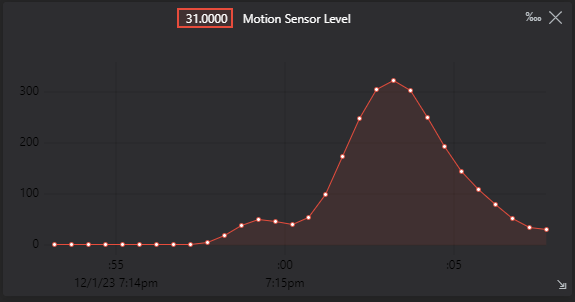
MPS_PresenceSensorLevel()
int MPS_PresenceSensorLevel()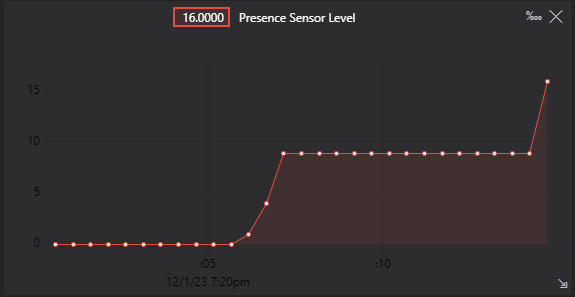
MPS_RADAR_UNINITIALIZED
int MPS_RADAR_UNINITIALIZEDMPS_RADAR_RSSI_TOO_LOW
int MPS_RADAR_RSSI_TOO_LOWMPS_MINIMUM_RSSI
int MPS_MINIMUM_RSSIMPS_CONNECTION_LOST
int MPS_CONNECTION_LOSTПримеры использования
Подключение библиотеки и ее запуск
#include <ESP_MPS.h>

void setup() {
  Serial.begin(115200);
  Serial.println("Booting...");

  if (MPS_StartWiFiConnection(SSID, password))
  {
    Serial.println("Wi-Fi connected!");
  }

  MPS_Setup(-64);
}Вывод дистанции
void loop() {
  float distance = MPS_GetDistance();
  Serial.print("distance: ");
  Serial.println(distance);
}
Вывод данных с датчиков
void loop() {
  int MotionSensorLevel = MPS_MotionSensorLevel();
  int PresenceSensorLevel = MPS_PresenceSensorLevel();

  if (MotionSensorLevel == MPS_RADAR_UNINITIALIZED)
  {
    Serial.println("The radar is not initialized. You must initialize it before use.");
  }
  else if (MotionSensorLevel == MPS_RADAR_RSSI_TOO_LOW)
  {
    Serial.print("Wi-Fi signal too low. Minimum RSSI limit is: ");
    Serial.println(MPS_MINIMUM_RSSI);
  }
  else if (MotionSensorLevel == MPS_CONNECTION_LOST)
  {
    Serial.println("Wi-Fi signal is 0. Perhaps the connection is lost.");
  }
  else if (MotionSensorLevel < 0)
  {
    Serial.print("Wait for the filling of the buffer. Remains to wait: ");
    Serial.println(MotionSensorLevel);
  }
  else
  {
    Serial.print("Motion Sensor Level: ");
    Serial.println(MotionSensorLevel);
    Serial.print("Presence Sensor Level: ");
    Serial.println(PresenceSensorLevel);
  }
}
Вывод ослабления сигнала
void loop() {
  Serial.print("RSSI:");
  Serial.println(MPS_RSSI());
}
Вывод информации о том, что датчик засек даижение
void loop() {
  if (MotionSensorLevel > 60)
  {
    Serial.println("!!! ALARM !!!");
  }
}